
Leaderboard screen
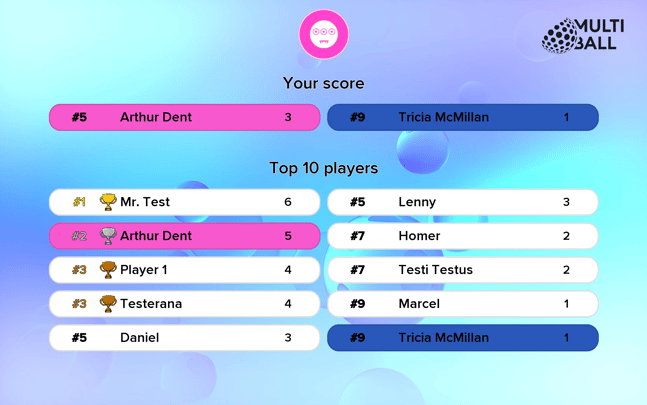
The leaderboard is divided into three parts:
- At the very top you can see the game logo and on the right side the MultiBall logo.
On the left, you will be able to include your own logo in the future. - "Your score" shows the score and rank of the currently logged in players.
You can log in using either the LYMB.iO app or our player queue feature. - "Top 10 Players" shows the ten best players according to the setting that you defined in your admin page "Game ranking settings" section.
The colors highlight the currently logged in players, the rank is indicated with a hashtag "#", the three best players have a trophy next to their name. If two or more players scored the same amount of points, they also get the same rank.
You can change the settings of the in game leaderboard using the "Game ranking settings" tab in your admin page.
Leaderboard settings
-
Sign in to the admin and open your system overview.
-
Find your system, then click Settings.
-
Open the Leaderboard category.
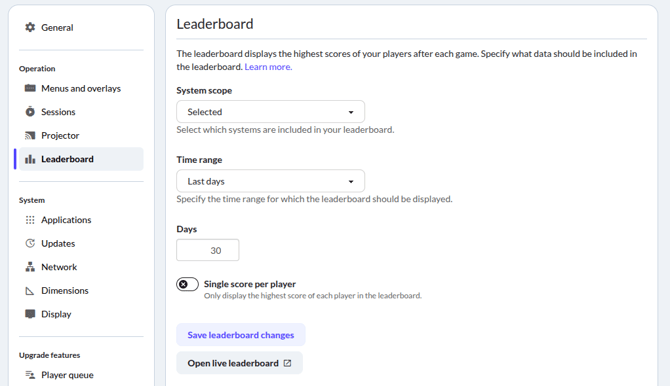
The System scope selection gives you three options:
- Global : The scores of all systems worldwide are included in the leaderboard.
- Owned : The scores of all your owned system are included in the leaderboard.
- Selected : The scores of only the selected system are included in the leaderboard, usually this is the option you want.
Use Time range to specify which matches should be included in the current leaderboard.
Finally, the Single score per player checkbox allows you to switch been showing every score or only the highscore of every player.
Click Save leaderboard changes to confirm your selection.
Clear the leaderboard
You can clear your leaderboard by setting a custom Time range. For example:
- Want to clear the leaderboard once? Set Time range to Date until now and select a date. All results before this date are cleared.
- Want to automatically clear the leaderboard on a regular basis? Set Time range to Last days and specify a number of days. All older results are cleared automatically.
Leaderboard customization (Paid feature)
Some aspects of the in-game leaderboard may be customizable via Asset Flips. Exact options vary from game to game, but may include
- Replacing the background with an image or video
- Disabling or replacing the game icon
- Adjusting text and element colors
- Adding a custom logo to the top right corner
- Replacing text fonts
- Replacing the trophy-images shown for the top player results, including expanding the list of images to go beyond the top 3 positions.
If a game is lacking one of those desired options in its Asset Flip settings, feel free to contact gamedev@lymb.io and we can discuss the possibility of enabling those settings for that game.