Managing Asset Flip Installations by System
You can view, install and remove Asset Flips on a system from the admin settings page. This approach also allows you to remove asset flips installed by other accounts to your system.
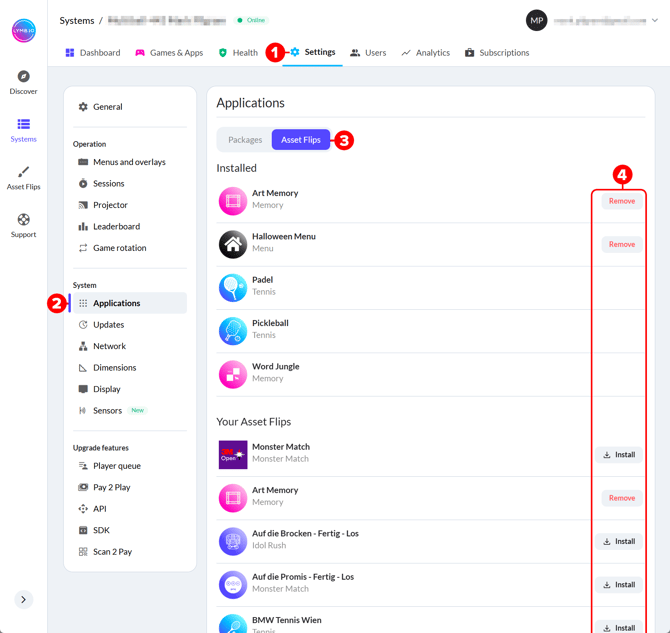
With the system you wish to manage selected...
- Open the "Settings" page
- Select "Applications"
- Select "Asset Flips"
- Choose which installed Asset Flips you wish to remove, or which Asset Flips from your account you wish to install. Some pre-installed asset flips may be unremovable, as shown for "Padel", "Pickleball" and "Word Jungle" in the example image below.
Managing Asset Flip Installations by Asset Flip
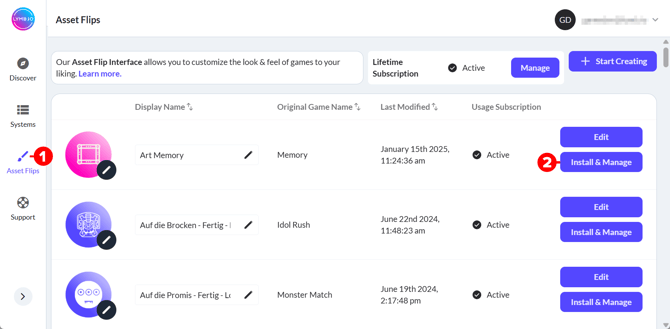
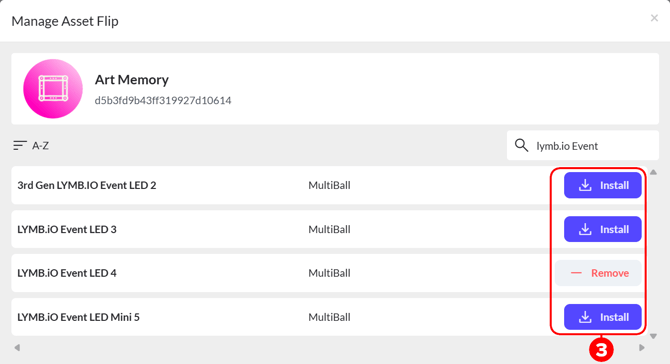
If you wish to install or remove a single Asset Flip from multiple systems managed by your account, it may be more convenient to do so via the admin "Asset Flips" page. This approach requires that the Asset Flip you wish to manage to be associated with your account.
- Select the Asset Flips page in the sidebar
- Select Install & Manage for the asset flip you wish to manage. A management popup-window will appear.
- Use the "Install" and "Remove" buttons to install or remove the Asset Flip from individual systems managed by your account.