
The Player Queue is a rotating waiting list for your system. Players line up, take their turn, and the next player or players are brought on automatically.
Use it whenever more people want to play than can play at once: a busy court, an event booth, or open-play sessions where you want a fair, first-come order instead of chaos.
Your system needs an active connection to our servers to use the Player Queue.
Start using the Player Queue
Navigate to the Queue page of your system
- Sign in to the admin and open your system overview
- Find your system, then click Dashboard
- Open the Queue tab
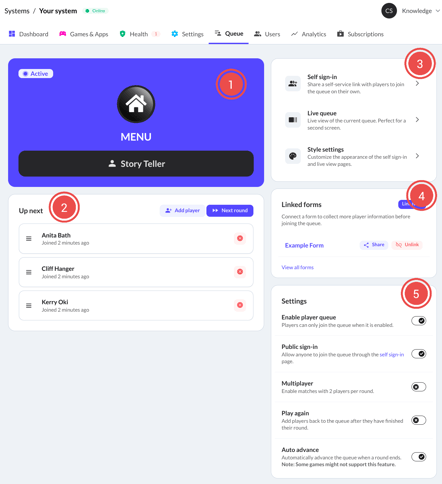
- Status panel: Shows the current status of the player queue, which game is being played and which players are currently active.
- Queue: List of upcoming players with queue controls.
- Click Add player to append a new player to the end of the queue.
- Click Next round to manually advance the queue.
- Quick links: Access other pages relevant to the Player Queue.
- Self sign-in: Open the self sign-in page of this system or share the join link. Players can scan a QR code to join directly from their mobile device.
- Live queue: Open the live view of the player queue. This works well on a second screen to display the queue to waiting players.
- Style settings: Open the style settings of your system to customize the appearance of the live queue and self sign-in pages. This is a Player Queue Pro feature.
- Linked forms: Connect forms to your Player Queue to collect more player information. This is a Player Queue Pro feature.
- Settings: Configure the behavior of your Player Queue.
- Enable player queue: Players can only join the queue when it is enabled.
- Public sign-in: If enabled, the self sign-in page is publicly available. Players can join by scanning the QR code from their own device. If disabled, only logged in users with access to your system can open the page.
- Multiplayer: If enabled, two players are activated on every round if possible. If not enabled, only one player is activated at a time.
- Play again: If enabled, players that completed their round are appended to the end of the queue again.
- Auto advance: If enabled, the queue is advanced automatically after a round is completed.
The Auto advance might not be supported by all games. Exceptions still require you to manually advance the queue.
Let players sign themselves in
Instead of adding every player by hand, you can let people join the queue themselves from their own phone or from a device you provide. Enable the Public sign-in and share the Self sign-in link with your players. You can display a QR code using the Self sign-in quick link. Print this QR code, or show it on a second screen.
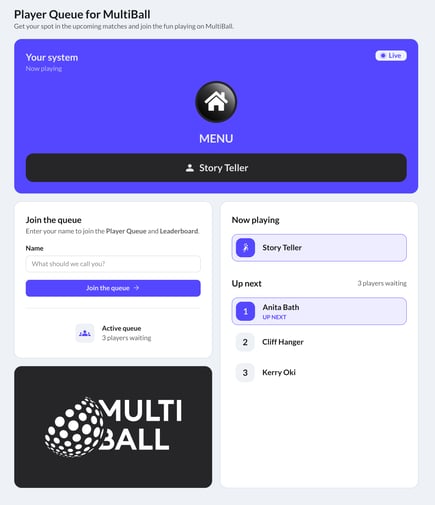
Your players will land on a self sign-in page that looks like this:
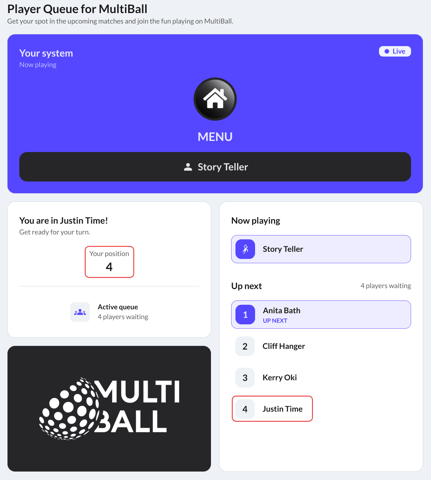
After joining the queue, players will see their current position in the queue, which updates in real-time. Their name also shows up in the upcoming players list.
Refer to the Settings Section for more details on how to configure this feature.