
Use the Transfer ownership section to move your system to a different user account. This process is recommended when selling your hardware or transitioning management responsibilities to a new administrator.
Make sure you are currently listed as an Owner of the system want to transfer. The following process is only available to users with the Owner role.
-
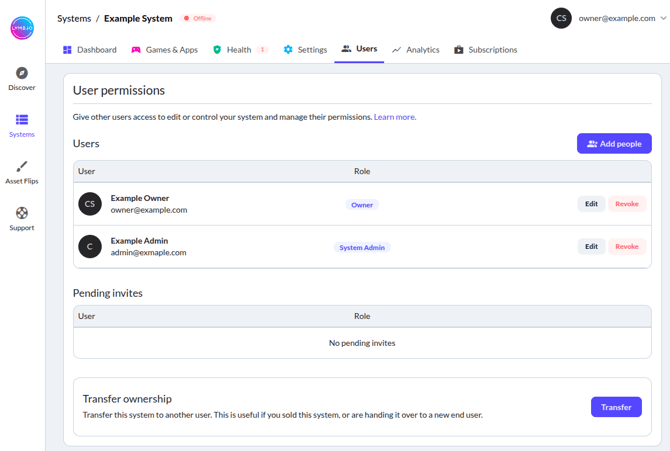
Open your system's Users tab. If you own multiple systems, make sure you selected the system you want to move from your Systems overview.
- At the bottom of the page, you will find a Transfer ownership box. Click on Transfer.
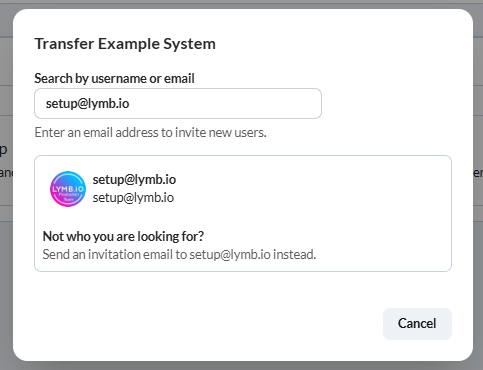
- Enter the email address of the new system owner:
- If they already have an account with us, select it to give them instant access to the system.
- If they do not have an account yet, click Send an invitation email to send an invite to the email address you entered. The ownership transfer will be completed once the recipient created their account and accepted the invite.
- Select the role you want to retain:
- With Retain distributor role the system will stay in your account, but with less permissions. For more information about roles, check out the User Management article.
- Fully transfer system completely removes the system from your account.
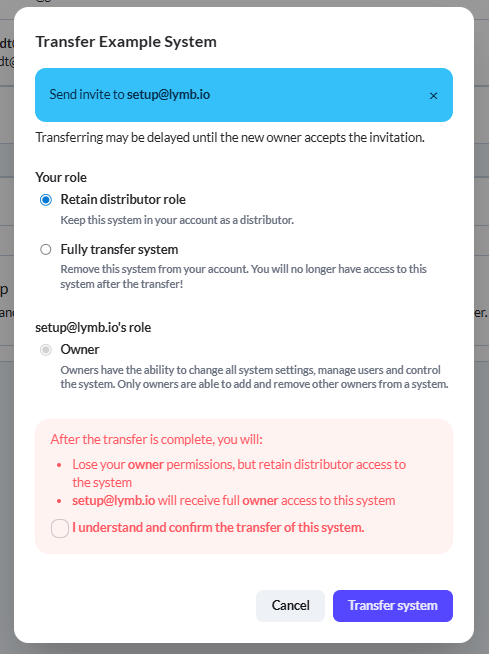
- Acknowledge the transfer by checking I understand and confirm the transfer of this system and click Transfer system to finalize the transfer.